
Why build a hub of your own#
Keeping all your LLM conversations in one place, running on your own machine, fixes three problems at once: scattered history, what leaves your computer, and the cost of several subscriptions.
I used to bounce between AIs in different tabs and apps, and every conversation stayed stuck in the service where it started. This article describes the setup I settled on: Ollama to run the models, Open WebUI as the chat interface, and OpenCode as a coding agent, all in containers with rootless Podman and a 16 GB AMD RX 9070 XT.
Running Ollama, Open WebUI and OpenCode in containers is also a decision about security and control. The container isolates each piece from the operating system it runs on and adds one more layer to keep the AI away from what it was not asked to touch, such as files outside the project, credentials or the network. It does not guarantee that nothing can happen, but it narrows the reach of a model mistake or a careless command.
Two caveats up front. The hub centralizes conversations going forward, but it does not import your old history from cloud services by itself. And local models in the 14B to 20B parameter range are useful day to day, but they make more mistakes on large tasks than cloud models do.
How the pieces fit together#
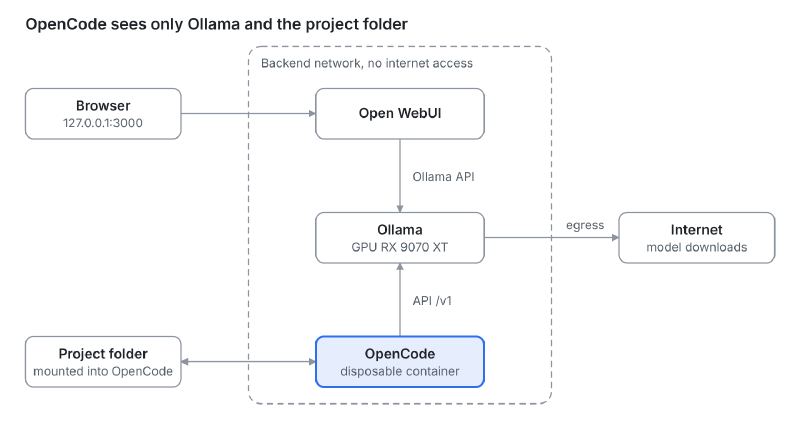
The browser talks only to Open WebUI, and Open WebUI and OpenCode talk only to Ollama, over the internal network. The egress network is used only by Ollama and Open WebUI, to download models; OpenCode, highlighted, has no way out to the internet and sees only the project folder.
Choosing the pieces#
Every layer of the hub has more than one good option. I picked the lowest-friction one for daily use and noted the alternatives.
| Layer | My pick | Alternatives | Why |
|---|---|---|---|
| Chat interface | Open WebUI | LibreChat, LobeChat, AnythingLLM | One container, and it finds Ollama on its own |
| Inference | Ollama | llama.cpp (llama-server), LM Studio | Handles model download, loading and unloading |
| Coding agent | OpenCode | Codex CLI, Aider, Goose, Crush | Works with 75+ providers and with local models |
| Runtime | Rootless Podman | Docker | Root inside the container maps to a regular user on the host |
Three notes on those choices:
- Ollama or llama.cpp. llama.cpp is the engine under Ollama and gives you more control, such as a quantized KV cache and partial offloading. In exchange, you manage the GGUF files yourself and run one model per server process. For daily use, Ollama’s convenience won.
- ROCm or Vulkan. On an AMD card, Ollama can use either path, but it makes no sense to combine them on the same GPU. Performance reports disagree, so the right call is to measure on your own hardware.
- OpenCode and subscriptions. OpenCode does not accept a login from a Claude subscription. Using Claude models in it requires an API key billed per token. If you want to keep your subscription, Claude Code is still the better fit.
Host prerequisites#
Rootless Podman only sees the GPU if your user has permission on the devices and SELinux lets the container use them. Four one-time adjustments:
- Add your user to the groups that guard the GPU devices, then log in again:
sudo usermod -aG render,video $USER- If SELinux is enabled, allow containers to use devices:
sudo setsebool -P container_use_devices on- Install
podman-compose(the commands below usednf; adapt them to your distribution):
sudo dnf install podman-compose- Make sure the driver is in place. Vulkan uses the standard driver (Mesa). The ROCm path needs the ROCm 7 driver on the host, according to Ollama’s GPU documentation.
One detail that costs time: in rootless Podman, the container needs the special value keep-groups (--group-add keep-groups), which passes your user’s real groups through. Passing video or render by name often fails, because the name is looked up inside the container, where those groups may not exist.
Ollama and Open WebUI with compose#
The compose file starts only Ollama and Open WebUI. OpenCode stays out on purpose, because it is interactive and runs on demand (next section). Two networks separate what may reach the outside from what may not: backend, with no internet access, and egress, used only to download models.
This is the Vulkan variant (compose.vulkan.yml):
name: hub-llm

services:
  ollama:
    image: docker.io/ollama/ollama
    container_name: ollama
    restart: unless-stopped
    devices:
      - /dev/dri:/dev/dri
    group_add:
      - keep-groups
    environment:
      - OLLAMA_VULKAN=1
      - OLLAMA_CONTEXT_LENGTH=32768
      - OLLAMA_FLASH_ATTENTION=1
      - OLLAMA_KV_CACHE_TYPE=q8_0
      - OLLAMA_KEEP_ALIVE=10m
    volumes:
      - ollama:/root/.ollama
    networks: [backend, egress]

  openwebui:
    image: ghcr.io/open-webui/open-webui:main
    container_name: openwebui
    restart: unless-stopped
    depends_on:
      - ollama
    ports:
      - "127.0.0.1:3000:8080"
    environment:
      - OLLAMA_BASE_URL=http://ollama:11434
      - ENABLE_SIGNUP=${ENABLE_SIGNUP:-true}
    volumes:
      - openwebui:/app/backend/data
    networks: [backend, egress]

networks:
  backend:
    name: hub-llm-backend
    internal: true
  egress:
    name: hub-llm-egress

volumes:
  ollama:
  openwebui:
The ROCm variant (compose.rocm.yml) changes only the ollama service: the image becomes docker.io/ollama/ollama:rocm, the /dev/kfd:/dev/kfd device is added next to /dev/dri, and OLLAMA_VULKAN=1 goes away. Keep only one of the two files up at a time; the volumes are shared, so you can switch back and forth without downloading the models again.
To start everything and pull a model:
podman-compose -f compose.vulkan.yml up -d
podman exec -it ollama ollama pull qwen3:14b
The interface lives at http://127.0.0.1:3000. The port is published on the loopback address only, on purpose. On first visit you create the administrator account; after that, set ENABLE_SIGNUP=false and bring the stack up again to close registration.
To confirm the GPU is in use, run podman exec ollama ollama ps and check that the PROCESSOR column says GPU.
Isolating OpenCode#
OpenCode is the only component that runs commands and changes files, so that is where isolation matters. The rule is simple: it sees the project folder, its own configuration and Ollama, and nothing else.
I used the image published by the project itself, ghcr.io/anomalyco/opencode. Inspecting it, I found that it runs as root (with HOME=/root), ships rg, and does not ship git. The missing git in the image is a known issue, and OpenCode features such as identifying the project and tracking changes depend on it. Because the container has no internet access, git has to go into the image itself. A three-line Containerfile does it:
ARG OPENCODE_TAG=latest
FROM ghcr.io/anomalyco/opencode:${OPENCODE_TAG}

RUN apk add --no-cache git \
    && git config --system --add safe.directory /workspace
Pin a version instead of latest. An agent with access to your project should not change behavior without notice.
Running it is a podman run with the essentials for isolation:
podman run --rm -it \
  --network hub-llm-backend \
  --cap-drop=ALL \
  --security-opt no-new-privileges \
  --memory 4g --pids-limit 512 \
  -w /workspace \
  -v "$PROJECT_DIR":/workspace:Z \
  -v ~/.config/hub-llm/opencode.json:/etc/opencode/opencode.json:ro,z \
  -e OPENCODE_CONFIG=/etc/opencode/opencode.json \
  -v opencode-data:/root/.local/share/opencode \
  -v opencode-cache:/root/.cache/opencode \
  localhost/opencode-hub:<tag>
What each part does:
--network hub-llm-backend: the internal network, with no way out to the internet. The container can only reach Ollama.--cap-drop=ALLandno-new-privileges: no extra capabilities and no privilege escalation.:Z: SELinux relabels the project folder for the container. Use dedicated project folders, because everything inside the mounted folder gets relabeled.- No
--userns=keep-id: the image runs as root, and in rootless Podman the container’s root maps to your user on the host. Files the agent creates remain yours. OPENCODE_CONFIG: points to the config file explicitly. OpenCode findsopencode.jsoneven if the image’s$HOMEchanges, instead of relying on/root/.config/opencode/.
I wrapped all of this in a script called opencode, placed in ~/.local/bin. With no arguments it opens in the current folder; with a path, it opens there. Since it is easy to open the wrong folder, the script also refuses $HOME, system folders and credential folders (.ssh, .kube, .aws and similar), and asks for confirmation when the folder is not the root of a git repository. The script, the Containerfile and opencode.json live in ~/.config/hub-llm/.
Pointing OpenCode at Ollama#
The opencode.json file declares Ollama as an OpenAI-compatible provider and picks the default model:
{
  "$schema": "https://opencode.ai/config.json",
  "model": "ollama/qwen3:14b",
  "share": "disabled",
  "autoupdate": false,
  "permission": {
    "edit": "allow",
    "bash": "ask"
  },
  "provider": {
    "ollama": {
      "npm": "@ai-sdk/openai-compatible",
      "name": "Ollama (container)",
      "options": {
        "baseURL": "http://ollama:11434/v1"
      },
      "models": {
        "qwen3:14b": {
          "name": "Qwen3 14B",
          "limit": { "context": 32768, "output": 8192 }
        },
        "gpt-oss:20b": {
          "name": "gpt-oss 20B",
          "limit": { "context": 32768, "output": 8192 }
        }
      }
    }
  }
}
A few points deserve attention:
- Model names must match the output of
ollama listexactly. limit.contextshould follow theOLLAMA_CONTEXT_LENGTHset in the compose file. Ollama’s default is usually too small for a coding agent.share: disabledprevents public conversation links, andautoupdate: falsemakes sense in a container with no internet.- With
bash: ask, every shell command asks for confirmation. If that is too much, switch it toallow: the container is isolated and the project is under git. - OpenCode’s configuration schema changes between versions. If a key is rejected, the error message at startup tells you which one.
Skills, plugins and online mode#
OpenCode runs without internet day to day, but some extensions need it. The way out is to separate what is just files from what needs a download.
- Skills are folders with a
SKILL.mdand need no network. Download them on the host, read them, and put them in~/.config/hub-llm/skills/. The script mounts that folder, read-only, at/root/.config/opencode/skills/. Project-specific skills can live in.opencode/skills/inside the repository. - Local plugins (
.jsor.tsfiles) work the same way, in~/.config/hub-llm/plugins/. - npm plugins, declared under the
"plugin"key inopencode.json, are installed by OpenCode with Bun at startup and cached in~/.cache/opencode/node_modules/. That path is theopencode-cachevolume, so internet is needed only once.
For that last case, the script has an online mode. It asks for confirmation and applies to that session only:
OPENCODE_ONLINE=1 opencodeIn this mode the container also joins the hub-llm-egress network. Install the plugin, exit, and go back to plain opencode: the plugin stays in the cache and works offline.
Why not stay online all the time? A local model does not remove the risk, because the agent is what runs commands. With internet, a prompt injection hidden in a README or a dependency can lead the agent to send the folder’s contents out, and 14B to 20B models fall for that kind of trick more easily. Without a network, the worst case is a broken folder, and git rolls it back. With a network, the worst case is a leaked folder, and there is no undo for that.
Pitfalls I hit#
Nearly every stumble came from the differences between Docker and rootless Podman. Here are the main ones, so you do not have to repeat the trip.
| Symptom | Cause | Fix |
|---|---|---|
Unable to find group keep-groups when bringing up compose | docker-compose was talking to the Podman socket, and the compatibility API treats keep-groups as a regular group | Use podman-compose, or force it with PODMAN_COMPOSE_PROVIDER=podman-compose |
| Container has no GPU access, or a missing-group error | group_add with video and render by name in rootless mode | Use keep-groups and add your user to the groups on the host |
Containerfile.opencode: no such file or directory | The script was moved to /usr/local/bin without its support files | Look for the files in ~/.config/hub-llm/ |
| No git inside the container | The official image does not include git | A derived image with apk add git |
| Cannot create the first Open WebUI account | ENABLE_SIGNUP=false from the start blocks the admin signup | Start with true and close it afterward |
Ollama models missing from OpenCode’s /models list; only the free OpenCode Zen models show | The opencode.json was mounted where OpenCode never looks: an older script used /home/node/.config/opencode/, but the official image uses HOME=/root | Mount it at /etc/opencode/opencode.json and pass -e OPENCODE_CONFIG=/etc/opencode/opencode.json. To check: opencode debug config |
The ollama provider disappears with no clear error | Invalid JSON in opencode.json, such as a missing } at the end of each model | Validate before use: python3 -m json.tool opencode.json |
One more point of attention: if OpenCode needs to download a package on first run, such as the provider package or a plugin, use OPENCODE_ONLINE=1 just that once. Whatever gets installed stays in the cache volume, and later sessions run without internet again.
If you use SELinux, remember the :Z on bind mounts and the container_use_devices boolean. Without them, permission problems show up as a bare “permission denied” with little to go on.
Models for 16 GB of VRAM#
With 16 GB, the starting point is models from 14B to 20B parameters, which fit entirely on the GPU. Two that I use as a base: qwen3:14b and gpt-oss:20b.
Larger models, such as the 30B variants, tend to exceed the VRAM and spill partly into system RAM. The result works, but it is much slower. Three habits help keep everything on the GPU:
- Context. The larger the context, the larger the KV cache. If VRAM runs short, lower
OLLAMA_CONTEXT_LENGTHbefore switching models. - Quantized KV cache.
OLLAMA_KV_CACHE_TYPE=q8_0, which requiresOLLAMA_FLASH_ATTENTION=1, shrinks the space the context takes. - Measurement. Run the same prompt on each backend and compare the generation rate:
podman exec -it ollama ollama run --verbose qwen3:14b "explain what an operator is in OpenShift"The eval rate field at the end shows tokens per second. Discard the first run, which includes loading the model. This is how you choose between ROCm and Vulkan on your own machine, instead of trusting third-party numbers.
A realistic expectation for the coding agent: local models in this range handle small and medium tasks, such as explaining a repository, writing tests and making targeted edits. On large changes and long chains of tool calls, they make more mistakes than cloud models. Start with short, specific requests, use the agent’s plan mode (the Tab key) when you are unsure what it will do, and commit before every session.
Security, limits and next steps#
Isolation lowers the risk but does not remove it. The limits I keep in mind:
- A container is not a virtual machine. It shares the host kernel. Rootless Podman helps, because an escape lands in an unprivileged user, but for stronger isolation consider running the whole stack inside a dedicated VM.
- The mounted folder is read and changed by the agent. Keep secrets out of it and commit before every session so you can roll back.
- The Open WebUI port stays on
127.0.0.1only. To reach it from another machine, prefer an SSH tunnel (ssh -L 3000:127.0.0.1:3000 user@host) over opening the port on the network. - Open WebUI’s code execution and tool features. If you do not use them, leave them off.
- Local models have quality limits. For heavy work, the hub coexists well with cloud providers. The safest route is a gateway such as LiteLLM, attached to both the
backendandegressnetworks: OpenCode stays offline and talks only to the gateway, and the API keys stay outside the agent’s container. Even so, whatever part of the project folder enters the context goes to the provider.
Possible next steps: try llama.cpp with Vulkan in place of Ollama to gain control over VRAM, and convert the files to Quadlet so systemd manages the containers and they come up with the system.
The practical result is a single place to talk to models and to code with an agent, running on my own machine, with the agent confined to the project folder. The complete files (compose, Containerfile, script and opencode.json) are short and reproducible.
Files#
The files used in this post, ready to download:
compose.vulkan.yml: Ollama (Vulkan) and Open WebUIcompose.rocm.yml: Ollama (ROCm) and Open WebUIContainerfile.opencode: the official OpenCode image plus gitrun-opencode.sh: theopencodescript, with online modeopencode.json: OpenCode config pointing at Ollama